




Two names come up constantly when people start shopping for iPad accessories: ESR and MOFT. They both have real fans, and for genuinely different reasons. The frustrating thing about most comparisons is that they either crown one brand across the board or present a fake balance where every MOFT advantage gets walked back two sentences later. Neither approach is actually useful.
Here’s a more honest take. ESR and MOFT are solving different problems. If you understand what problem you actually have and be honest about how you use your iPad every day — picking between them gets a lot easier.
Two Very Different Philosophies
Pick up an ESR case and the first thing you feel is substance. The ESR Shift Magnetic Stand Case has a two-part construction: a rugged back cover with reinforced Air Guard corners snaps to a detachable magnetic stand. The whole thing is designed around the idea that your iPad is going to move around a lot, take some bumps, and needs to hold a position without sliding on whatever surface you’ve put it on.
MOFT works from almost the opposite premise. Their Snap Float Folio is designed to feel like the case barely exists. The origami-fold stand is elegant and adds almost no bulk. For someone who keeps their iPad in a clean bag that goes to a clean desk in a clean office, it’s genuinely beautiful gear.
The question is just which kind of person you actually are.
Heavy Typing: Where ESR’s Detachable Keyboard Stands Apart
For anyone who types on their iPad regularly drafting, emails, writing documents, anything over a few paragraphs the keyboard is the whole conversation.
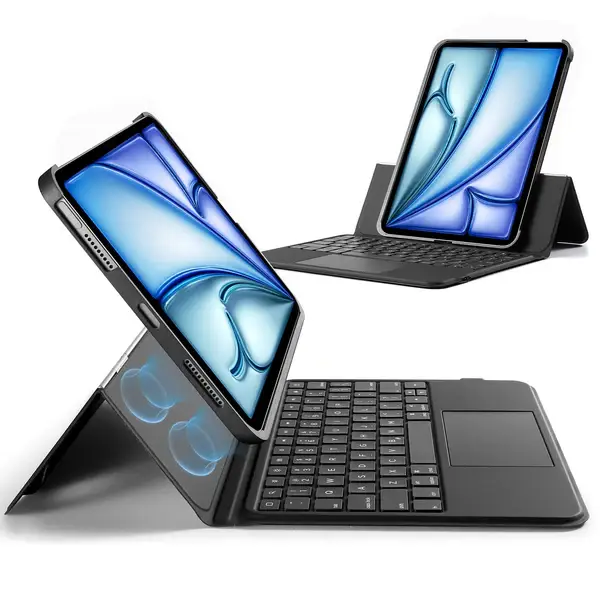
The ESR Shift Keyboard Case at $99.99 for the iPad Air 13″ (M4) 2026 has a detachable design that most keyboard cases don’t attempt. This Removable iPad Keyboard Case attaches magnetically; pop it off and you’re holding a protected iPad with nothing underneath it. Put it back when you need to write. That sounds simple, but in practice it’s a genuine quality-of-life difference you’re not lugging keyboard weight when you’re reading, watching something, or sketching.
The keyboard itself has a full row of function keys and an edge-to-edge trackpad. The stand adjusts from 20° to 75°, which covers drawing angles, normal typing position, and the “raised landscape” mode that lifts the screen noticeably higher than a standard folio — closer to eye level, which your neck will appreciate after a few hours of work.
MOFT’s approach with the Snap Float Folio is slimmer and lighter, and the float mode does create a better viewing angle than flat placement. But the typing surface sits on a thinner base, and heavy typing can feel less planted. It’s genuinely fine for light use and short bursts. If you’re knocking out long documents regularly, the ESR keyboard’s wider base and trackpad feel more like a laptop substitute, less like a tablet workaround.
Who this dimension favors: heavy typers, people working from their iPad as a primary computer → ESR. People who type occasionally and prioritize keeping the iPad thin and light → MOFT makes a reasonable case.
Apple Pencil, Drawing, and Creative Work
Before getting into entertainment, it’s worth stopping here because the Apple Pencil question belongs in the work section, not in “media consumption.”
Artists, students, designers, and anyone who sketches or handwrites notes will find ESR’s angle options directly relevant. The 20° low-angle setting on both the Shift Keyboard Case and the Shift Magnetic Stand is designed specifically for drawing it mimics the incline of a sketchbook without your hand bumping into a raised stand. The magnetic flap that supports it in this mode is sturdy enough that the iPad doesn’t wobble under drawing pressure, which matters more than it sounds when you’re doing fine detail work.
The Shift Keyboard Case also includes dual Pencil storage: a magnetic holder and an elastic sleeve, so the stylus doesn’t get knocked off during transport. If you’ve ever fished an Apple Pencil out from between seat cushions, you’ll appreciate this.
MOFT relies on the iPad’s built-in magnets to hold the Pencil during travel, which works fine under normal conditions but gives less security in a bag. Both cases provide workable drawing angles; the ESR setup is more deliberate about it.
Protection and Travel

This is where the ESR vs. MOFT split is most concrete, and where your lifestyle matters most.
The ESR Shift Magnetic Stand Case ($52.99) has reinforced corners designed to absorb drop impact. If your iPad commutes to work, goes to a coffee shop, occasionally rides in a packed bag next to a water bottle, or has seen the inside of a backpack at full capacity — that matters. The magnets holding the stand in place are calibrated to hold the angle you set even on uneven surfaces. Put it on a café table that wobbles slightly and it stays where you put it.
MOFT is the right call if your iPad mostly lives in controlled environments. The slim shell protects against scratches and light impacts, but it’s not engineered for drops. For someone who works from home 90% of the time and keeps their device on a clean desk, MOFT’s minimal profile is genuine value. It fits into tight sleeves, it’s lighter in the bag, and it won’t add visual bulk.
The practical test: imagine your iPad slipping off the arm of a couch. With ESR, you wince but probably move on. With MOFT, you check the corners carefully. Neither is the wrong answer — it just depends on how often that scenario is realistic in your life.
Viewing Angles and Media
As an iPad Case with Stand, the ESR Shift Magnetic Stand Case offers 9 positions total — 6 landscape angles and 3 writing/drawing angles, including portrait mode, which is genuinely useful for reading long documents or using the iPad vertically in a tight space. The stand holds any of these positions without drift.
MOFT’s origami design gives you 3 to 4 positions. The “float” mode, which elevates the iPad above the keyboard level, is a great viewing angle for browsing or light reading. For sustained media watching — a full movie, a long YouTube session — ESR’s range of adjustments lets you dial in exactly the angle your setup needs. On a train tray table, for example, being able to drop the angle 5 degrees to avoid glare is the kind of thing that sounds trivial until you’re trying to do it.
One thing MOFT genuinely does better here: the origami fold looks more considered. It reads as intentional design rather than a utilitarian pivot. If the aesthetic of your desk or the impression you make pulling out your iPad in a meeting matters to you, MOFT has an edge in that purely visual dimension.
The Rebound 360: When You Want Everything in One Package
Worth mentioning separately: the ESR Rebound Magnetic Keyboard Case 360 ($119.99) takes a different approach than the Shift. Instead of a detachable keyboard, it uses a folio design with a magnetic snap-on stand that pivots fully around the case. It’s designed for people who want the keyboard always available but want more flexibility in how the stand positions — it functions as both a typing setup and a stand without removing anything.
The Rebound sits between the Shift Keyboard ($99.99) and a premium folio in terms of what it does. If you don’t need the keyboard to physically leave the case, but you do want more stand versatility than a standard folio gives you, it’s a strong option. At $119.99 (down from $149.99), it’s also the priciest of the three ESR options covered here — but covers the widest range of use cases in one product.
Who Should Actually Pick Each One
If you type heavily on your iPad, want a drawing setup with proper angle support, carry your device in varied environments, or need serious protection without sacrificing stand versatility → ESR Shift series.
If you work mostly from one clean environment, your iPad rarely gets bumped, you type lightly, and having the thinnest possible case matters to you or the way the device looks on your desk MOFT is legitimately the right pick. It’s not the consolation prize; it just solves a different problem.
The Shift Magnetic Stand at $52.99 is worth considering even if you’re not sure — it covers the stand and protection basics without the keyboard, at a lower price than MOFT’s comparable options — a big reason ESR Tech has earned its reputation with value-focused buyers — and with better drop protection.
Quick Reference
ESR Shift Stand ($52.99) | ESR Shift Keyboard ($99.99) | MOFT Snap Float | |
Viewing positions | 9 (incl. portrait) | 20°–75° landscape + 20° draw | 3–4 |
Drop protection | Air Guard corners | Air Guard corners | Basic shell |
Keyboard | No | Detachable, full function row | Separate/thin folio |
Pencil storage | Magnetic slot | Dual holder + sleeve | Built-in magnets only |
Best for | Protection + flexibility | Heavy work + travel | Light use + slim priority |
Frequently Asked Questions
Can I use the ESR Shift Keyboard Case without the keyboard attached? Yes — that’s the whole point of the detachable design. You snap the keyboard on when you need it and remove it for reading, sketching, or anything where the weight isn’t worth it. The iPad stays fully protected either way.
Is MOFT good for travel? For controlled travel (carry-on, hotel desk), yes. For rougher commuting or environments where drops are realistic, the ESR cases offer meaningfully better impact protection with the Air Guard corners.
What’s the difference between the ESR Shift Keyboard and the Rebound 360? The Shift Keyboard has a physically detachable keyboard — you can completely separate the two parts. The Rebound 360 keeps keyboard and stand integrated in one folio with a magnetic pivoting stand. The Shift is better if you frequently want a tablet-only experience; the Rebound is better if you want the keyboard always there but more stand flexibility.
Does the ESR stand hold steady at lower angles for drawing? The Shift Magnetic Stand’s 20° position is specifically designed for writing and drawing, supported by a sturdy magnetic mechanism that holds under hand pressure without wobble.
Are there color options beyond black? The Shift Magnetic Stand comes in eight colors including Navy Blue, Purple, Titanium, Brown, and Red. The keyboard cases come in Dark Gray and Purple layouts.